When you go to deploy a BizTalk360 solution, you should take into account these requirements or steps.
Wednesday, May 24, 2017


Wednesday, May 17, 2017
Logic Apps and EDI (V)
This post continues the Logic Apps and EDI series of post, that I began weeks ago:
In this post I go to explain how monitor and tracking B2B scenarios using OMS.
Monday, May 08, 2017
Creating your first Logic App Connector
In this post I will explain, how to implement a simple Connector and use it on a Logic App.
Logic Apps and EDI (IV)
This post continues the Logic Apps and EDI series of post, that I began weeks ago:
In this post I go to explain how get the "Good" and the "Bad" decoded messages from EDIFACT Decode Component.
Thursday, April 27, 2017
Logic Apps and EDI (III)
This post continues the Logic Apps and EDI series of post, that I began last week:
In this post I go to explain how to modify our Agreement, to allow receive from CompanyA, messages of type INVOICE_99B_D.
Tuesday, April 25, 2017
Logic Apps and EDI (II)
This post continues the Logic Apps and EDI series of post, that I began last week.
In this post I want to explain, how to manage errors when Resolve EDIFACT Agreement doesn't found the agreement or any other error.
In this post I want to explain, how to manage errors when Resolve EDIFACT Agreement doesn't found the agreement or any other error.
Monday, April 24, 2017
Global Azure and Integration Bootcamps 2017
Last month I was speaking about Logic Apps on the last two great events.
First was on Saturday 25th March at Madrid, Global Integration Bootcamp, where I talked about Serverless, Logic Apps and Enterprise Integration Pack and the similarities between BizTalk and the PaaS (API Management, Service Bus, Azure Functions and Logic Apps). You can see my slides here.
First was on Saturday 25th March at Madrid, Global Integration Bootcamp, where I talked about Serverless, Logic Apps and Enterprise Integration Pack and the similarities between BizTalk and the PaaS (API Management, Service Bus, Azure Functions and Logic Apps). You can see my slides here.
Friday, April 21, 2017
Logic Apps and EDI (I)
When I began to write this post, my first intention was demonstrate how to migrate a BizTalk EDI Application to Logic Apps with Enterprise Integration Pack, but then I thought to begin with a simple scenario.
I took a sample EDI application in BizTalk from other post (see https://abhijitmahato.wordpress.com/category/biztalk-edi/) and try to implement the same with Logic Apps and Enterprise Integration Pack.
Sunday, April 16, 2017
Versioning Logic Apps feature
Now in Logic Apps, you can see a list of all the versions of your Logic App. Before, Logic Apps supported storing only the previous versions of a Logic App every time you save it, but now you can see all the versions.
This is a great feature to quick rollback a production Logic App to a previous version, if there are any problems when you deploy your last version.
This is a great feature to quick rollback a production Logic App to a previous version, if there are any problems when you deploy your last version.
Wednesday, April 12, 2017
Tracked properties on Logic Apps and queries on Log Search or OMS
In our Logic App, we can add tracked properties onto different actions to track our custom data in diagnostics data.
Why we need to track properties? Because it can be very useful to search diagnostics data by custom values (e.g. The order's customer identifier).
Why we need to track properties? Because it can be very useful to search diagnostics data by custom values (e.g. The order's customer identifier).
Friday, April 07, 2017
Automated Testing Logic Apps with SpecFlow (I)
I start this series of post, talking about how to test our Logic Apps with SpecFlow for Visual Studio 2015. This week I have attended the event "Automated Testing with Logic Apps and Specflow" by Michael Stephenson and I will put in practice some of the ideas that Michael Stephenson talked in that event.
Thursday, April 06, 2017
Deploy or Re-GAC
If we want to update a BizTalk application, sometimes we can only Re-GACing our DLLs instead of redeploy. Obviously, in production environments is recommended to redeploy, but in development environments we can save time just ReGACing.
Wednesday, April 05, 2017
Deconstructing my GIB2017 Demo
Last Saturday, I participated as speaker at Global Integration Bootcamp 2017 at Madrid. You can find the slides of the event at Kabel's Blog.
Monday, March 06, 2017
Global Integration Bootcamp next March 25th 2017
Global Integration Bootcamp will be next March 25th, the first Integration Bootcamp with Microsoft technology held in Spain.
The event will be at Madrid. More info at http://www.kabel.es/globalintegrationbootcamp2017
"EDIFACT Fallback Settings" on Enterprise Integration Pack for Logic Apps
In the new Enterprise Integration Pack for Logic Apps, creating new EDI scenarios, they do not support "EDIFACT Fallback Settings" as there was in BizTalk. This functionality allows when BizTalk has not determined the agreement, apply a default agreement.
I have added this suggestion to feedback.azure.com: EDIFACT Fallback Settings suggestion
Friday, August 14, 2015
BizTalk ALM Webinar
Next 17-August-2015, Integration User Group offers a very interesting webinar about Continuous Integration for your BizTalk solutions. Here are the details:
http://www.integrationusergroup.com/?event=biztalk-alm&event_date=2015-08-17
http://www.integrationusergroup.com/?event=biztalk-alm&event_date=2015-08-17
Tuesday, September 09, 2014
Remove BOM sending a document
At the
beginning of UTF-8 or UTF-16 documents, usually are a set of not visible
characters called BOM (http://en.wikipedia.org/wiki/Byte_order_mark).
There are
some systems that doesn’t allow these characters on documents, then when we are
developing solutions on BizTalk and want to send a document to a system that
doesn’t understand BOM characters, we can add at the send pipeline an assembler
(XML or FLAT) and use their property Preserve
byte order mark.

If we set
to false this property, the
assembler will delete BOM characters of the outgoing document.
Friday, September 05, 2014
Expose BizTalk schemas as RPC Encoded
It's very easy to expose BizTalk schemas as RPC encoded. Do these steps:
1) On the service App_Code folder, open your csharp service files.
2) Comment SoapDocumentServiceAttribute:
//[System.Web.Services.Protocols.SoapDocumentServiceAttribute(Use=System.Web.Services.Description.SoapBindingUse.Literal, ParameterStyle=System.Web.Services.Protocols.SoapParameterStyle.Default)]
3) Use instead SoapRpcService
[System.Web.Services.Protocols.SoapRpcService]
4) Comment each SoapDocumentMethodAttribute:
//[System.Web.Services.Protocols.SoapDocumentMethodAttribute("namespaceAndMethod", OneWay=false, Use=System.Web.Services.Description.SoapBindingUse.Literal, ParameterStyle=System.Web.Services.Protocols.SoapParameterStyle.Default)]
5) Use instead SoapRpcMethod
[System.Web.Services.Protocols.SoapRpcMethod]
And that's all!
1) On the service App_Code folder, open your csharp service files.
2) Comment SoapDocumentServiceAttribute:
//[System.Web.Services.Protocols.SoapDocumentServiceAttribute(Use=System.Web.Services.Description.SoapBindingUse.Literal, ParameterStyle=System.Web.Services.Protocols.SoapParameterStyle.Default)]
3) Use instead SoapRpcService
[System.Web.Services.Protocols.SoapRpcService]
4) Comment each SoapDocumentMethodAttribute:
//[System.Web.Services.Protocols.SoapDocumentMethodAttribute("namespaceAndMethod", OneWay=false, Use=System.Web.Services.Description.SoapBindingUse.Literal, ParameterStyle=System.Web.Services.Protocols.SoapParameterStyle.Default)]
5) Use instead SoapRpcMethod
[System.Web.Services.Protocols.SoapRpcMethod]
And that's all!
Direct bound port error: "Illegal direct binding partner port"
If you get an "Illegal direct
binding port" as a compilation error when you have a Direct Port Binding between 2 orchestrations:
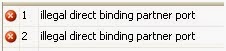
Maybe you have set
different Port on partner orchestration
on the two ports that are direct binding.
To configure correctly a Direct Port Binding, check the steps
given on http://msdn.microsoft.com/en-us/library/aa949436.aspx.
Here is an full example:
1.
In Orchestration A, select the Port shape
in the orchestration Toolbox. This starts the Port
Configuration Wizard.
2. On the Port
Properties page, in the Name field, type MyReceivePort. Click Next.
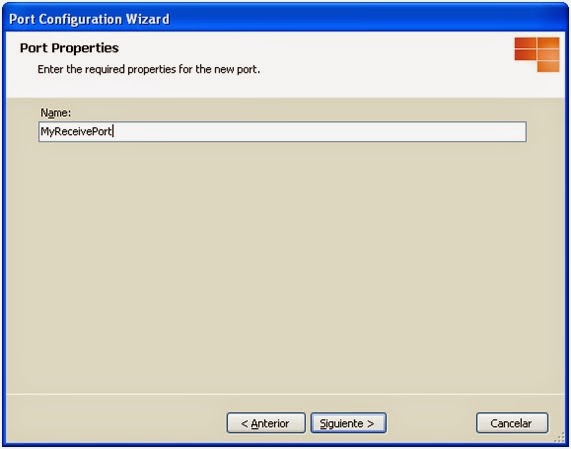
3. On the Select
a Port Type page, select Create a new Port Type. In
the Port Type Name field, type MyPartnerPortType. Click Next.

4.
On the Port Binding page, in
the Port direction of communication drop-down list,
select I'll always be receiving messages on this port. In the Port
binding drop-down list, select Direct.
5.
Select To receive messages from other
orchestrations, select this port here and in those orchestrations, and then
in the Port on partner orchestration drop-down list,
select OrchestrationA.MyReceivePort. Click Next.

6.
On the Completing the Port Wizard page,
click Finish.
7. In Orchestration
B, select the Port shape in the orchestration Toolbox. This starts the Port Configuration Wizard.
8. On the Port
Properties page, in the Name field, type MySendPort. Click Next.

9.
On the Select a Port Type page,
select Use an existing Port Type. Under Available Port
Types, select MyPartnerPortType, and then click Next.

10. On the Port
Binding page, in the Port direction of communication drop-down
list, select I'll always be sending messages on this port. In the Port
binding drop-down list, select Direct.
11. Select To
send messages to other orchestrations, select this port here and in those
orchestrations, and then in the Port on partner orchestration drop-down
list, select OrchestrationA.MyReceivePort. Click Next.
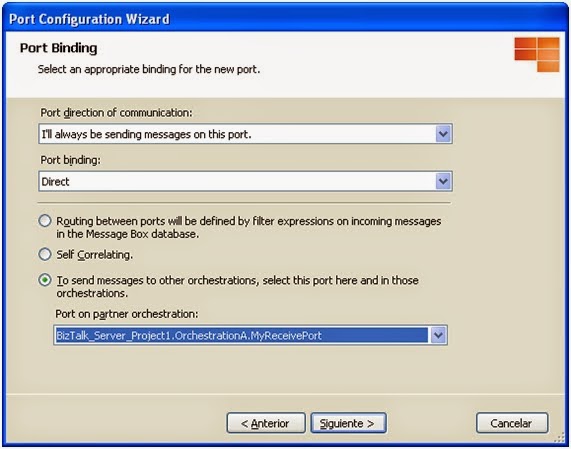
12. On the Completing
the Port Wizard page, click Finish.
Wednesday, May 16, 2012
Orchestration exposed as WCF service adds default serialization namespace to incoming and outgoing messages of type String, Int32, ..
If we need to publish an orchestration with message types System.String, System.Int32, ... (simple .NET Classes message types) as WCF service, we have to publish selecting "Publish Schemas as WCF service", instead of "Publish BizTalk orchestrations as WCF service"..
THE PROBLEM
I have developed a simple solution, with an orchestration that receives a System.Int32 message and returns a System.String message:

If we publish this orchestration as WCF service, using "Publish BizTalk orchestrations as WCF service", in the generated WSDL, we will find this messages:

Look that message types are int and string, but both namespaces are http://schemas.microsoft.com/2003/10/Serialization/.
I implemented a simple test C# console application to invoke the WCF service:

When I run this test console application, an unexpected exception is thrown:
<int xmlns="http://schemas.microsoft.com/2003/10/Serialization/"> was not expected.
Exception type: InvalidOperationException
Source: System.Xml
Target Site: System.Object Read_int()
THE SOLUTION
To avoid this error, we have to publish our solution using "Publish Schemas as WCF service" and include in our project a schema with primitive types, like:

And then publish our WCF service publishing this schemas as:


THE PROBLEM
I have developed a simple solution, with an orchestration that receives a System.Int32 message and returns a System.String message:

If we publish this orchestration as WCF service, using "Publish BizTalk orchestrations as WCF service", in the generated WSDL, we will find this messages:

I implemented a simple test C# console application to invoke the WCF service:

<int xmlns="http://schemas.microsoft.com/2003/10/Serialization/"> was not expected.
Exception type: InvalidOperationException
Source: System.Xml
Target Site: System.Object Read_int()
THE SOLUTION
To avoid this error, we have to publish our solution using "Publish Schemas as WCF service" and include in our project a schema with primitive types, like:

And then publish our WCF service publishing this schemas as:


In this step, the operation name have to be the same as operation name in orchestration (ReceiveInt32) and in request and response schema type, we have to select our schema with primitive types:

Subscribe to:
Posts (Atom)