Tuesday, September 09, 2014

Remove BOM sending a document

At the beginning of UTF-8 or UTF-16 documents, usually are a set of not visible characters called BOM (http://en.wikipedia.org/wiki/Byte_order_mark).

There are some systems that doesn’t allow these characters on documents, then when we are developing solutions on BizTalk and want to send a document to a system that doesn’t understand BOM characters, we can add at the send pipeline an assembler (XML or FLAT) and use their property Preserve byte order mark.


If we set to false this property, the assembler will delete BOM characters of the outgoing document.

Friday, September 05, 2014

Expose BizTalk schemas as RPC Encoded

It's very easy to expose BizTalk schemas as RPC encoded. Do these steps:

1) On the service App_Code folder, open your csharp service files.

2) Comment SoapDocumentServiceAttribute:

//[System.Web.Services.Protocols.SoapDocumentServiceAttribute(Use=System.Web.Services.Description.SoapBindingUse.Literal, ParameterStyle=System.Web.Services.Protocols.SoapParameterStyle.Default)]

3) Use instead SoapRpcService

    [System.Web.Services.Protocols.SoapRpcService]

4) Comment each SoapDocumentMethodAttribute:

//[System.Web.Services.Protocols.SoapDocumentMethodAttribute("namespaceAndMethod", OneWay=false, Use=System.Web.Services.Description.SoapBindingUse.Literal, ParameterStyle=System.Web.Services.Protocols.SoapParameterStyle.Default)]

5) Use instead SoapRpcMethod

[System.Web.Services.Protocols.SoapRpcMethod]

And that's all!

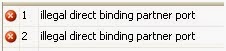
Direct bound port error: "Illegal direct binding partner port"

If you get an "Illegal direct binding port" as a compilation error when you have a Direct Port Binding between 2 orchestrations:

Illegal direct binding partner port

 Maybe you have set different Port on partner orchestration on the two ports that are direct binding.

To configure correctly a Direct Port Binding, check the steps given on http://msdn.microsoft.com/en-us/library/aa949436.aspx. Here is an full example:

1.     In Orchestration A, select the Port shape in the orchestration Toolbox. This starts the Port Configuration Wizard.
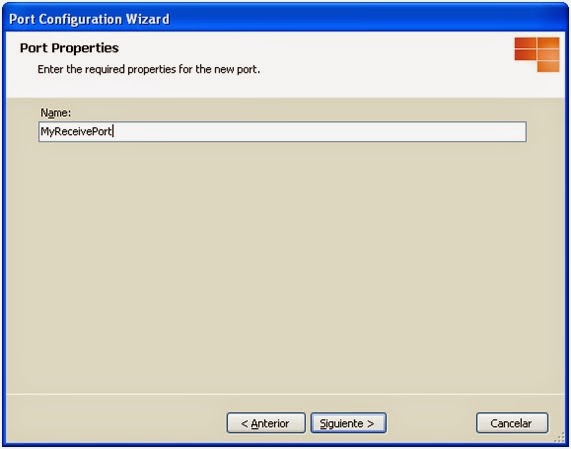
2.     On the Port Properties page, in the Name field, type MyReceivePort. Click Next.
Configure BizTalk Direct Binding Partner Port - Step 1
3.     On the Select a Port Type page, select Create a new Port Type. In the Port Type Name field, type MyPartnerPortType. Click Next.
Configure BizTalk Direct Binding Partner Port - Step 2
4.     On the Port Binding page, in the Port direction of communication drop-down list, select I'll always be receiving messages on this port. In the Port binding drop-down list, select Direct.
5.     Select To receive messages from other orchestrations, select this port here and in those orchestrations, and then in the Port on partner orchestration drop-down list, select OrchestrationA.MyReceivePort. Click Next.
Configure BizTalk Direct Binding Partner Port - Step 3
6.     On the Completing the Port Wizard page, click Finish.
7.     In Orchestration B, select the Port shape in the orchestration Toolbox. This starts the Port Configuration Wizard.
8.     On the Port Properties page, in the Name field, type MySendPort. Click Next.
Configure BizTalk Direct Binding Partner Port - Step 4
9.     On the Select a Port Type page, select Use an existing Port Type. Under Available Port Types, select MyPartnerPortType, and then click Next.
Configure BizTalk Direct Binding Partner Port - Step 5
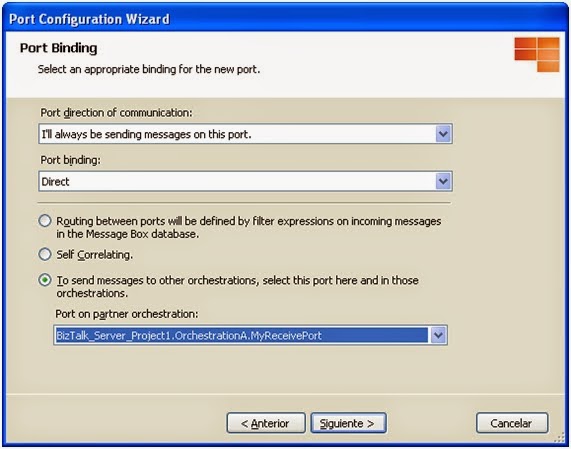
10. On the Port Binding page, in the Port direction of communication drop-down list, select I'll always be sending messages on this port. In the Port binding drop-down list, select Direct.
11. Select To send messages to other orchestrations, select this port here and in those orchestrations, and then in the Port on partner orchestration drop-down list, select OrchestrationA.MyReceivePort. Click Next.
Configure BizTalk Direct Binding Partner Port - Step 6
12. On the Completing the Port Wizard page, click Finish.

Wednesday, May 16, 2012

Orchestration exposed as WCF service adds default serialization namespace to incoming and outgoing messages of type String, Int32, ..

If we need to publish an orchestration with message types System.String, System.Int32, ... (simple .NET Classes message types) as WCF service, we have to publish selecting "Publish Schemas as WCF service", instead of "Publish BizTalk orchestrations as WCF service"..

THE PROBLEM

I have developed a simple solution, with an orchestration that receives a System.Int32 message and returns a System.String message:


If we publish this orchestration as WCF service, using "Publish BizTalk orchestrations as WCF service", in the generated WSDL, we will find this messages:


Look that message types are int and string, but both namespaces are http://schemas.microsoft.com/2003/10/Serialization/.

I implemented a simple test C# console application to invoke the WCF service:


When I run this test console application, an unexpected exception is thrown:

<int xmlns="http://schemas.microsoft.com/2003/10/Serialization/"> was not expected.
       
Exception type: InvalidOperationException
Source: System.Xml
Target Site: System.Object Read_int()


THE SOLUTION
 
To avoid this error, we have to publish our solution using "Publish Schemas as WCF service" and include in our project a schema with primitive types, like: 


And then publish our WCF service publishing this schemas as:


In this step, the operation name have to be the same as operation name in orchestration (ReceiveInt32) and in request and response schema type, we have to select our schema with primitive types:


Tuesday, May 15, 2012

WCF HTTPS BizTalk Send Port: "Could not establish secure channel for SSL/TLS with authority '<remote url>'"

I have an application that needs to connect to a https url, after deploying it and test, the send port returns this message:

"System.ServiceModel.Security.SecurityNegotiationException: Could not establish secure channel for SSL/TLS with authority '<remote url>'.  System.Net.WebException: The request was aborted: Could not create SSL/TLS secure channel."

Usually this error means that remote certificate is not valid, is not well installed, user that runs the send port doesn't have enough permissions, ... but after checking all, the problem still exists.

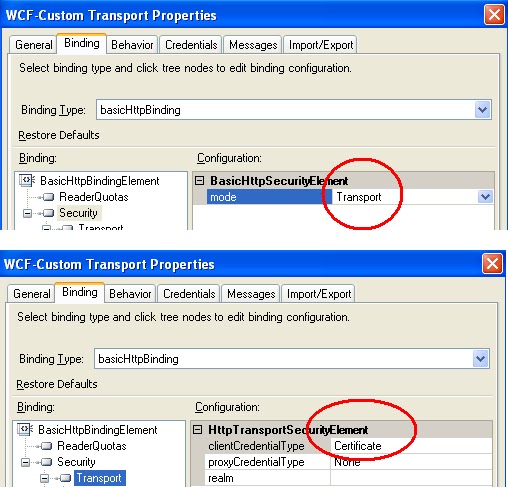
The send port was configured with basicHttpBinding, transport security mode and clientCredentials behaviour with both certificates, client and server certificates to establish https connection.

The problem was that in my WCF send port configuration, I forget to set clientCredentialType in Security -> Transport...the error message doesn't help:


Tuesday, May 08, 2012

Optional records in a positional flat file

This days I am working with a file with this structure:

AH Record (Mandatory): File's header, with 14 positions + AH identifier (AH12C0OMMTTD6204)
OD Record (Mandatory): 94 positions + OD identifier
EX Record (Mandatory): 6 positions + EX identifier
MN Record (Mandatory): 12 positions + MN identifier
XR Record (Optional): 4 positions + XR identifier
RF Record (Optional): 17 positions + RF identifier
PT Record (Optional): 2 positions + PT identifier


A sample file could be (all data is in the same line):

AH12C0OMMTTD6204OD9200000002                BUY 0001000.00M0ES0112805025    0000000000000090.000CODIGOCLIENTE5  EX040412MN100001000.00PT00

My first try, was to define a flat file schema with:
  • Records for each structure
  • Tag identifiers
  • Min occurs = 0 in optional records 
But the schema didn't work, because Min occurs = 0 doesn't work as I expected.

After reading this post http://www.codeproject.com/Articles/13707/Flattening-Out-the-Complexity-in-Flat-File-Schemas, I try to put optional records inside a Sequence block, with the same properties, now it works as I expected:


Monday, May 07, 2012

Error importing binding file from remote computer "Failed to create 'AdapterName' Transport Component"

Yesterday I was trying to deploy a BizTalk solution from a continuos integration server to our DEV environment. The solution was deployed perfect, but in the import bindings step, I get this error:

"Failed to create 'AdapterName' Transport Component"

Finally I found the solution. The problem was that in my continuos integration server, I haven't installed this adapter, I don't know why, but is needed.

You can get this error using whichever tool that you use: BTSTask, MSBuild extension pack, Deployment Framework for BizTalk...

XLANGPart.LoadFrom - "Value cannot be null. Parameter name: s as MemoryStream"

If we use a .NET library for construct an orchestration message from a Stream data, we need to use the following code:

orchestrationMessage[0].LoadFrom(someStream);

If we don't use a MemoryStream, we receive the following error:

"Value cannot be null. Parameter name: s as MemoryStream"

We need to copy our stream to a MemoryStream object and then construct the XLANGPart:


MemoryStream someMemoryStream = StreamToMemoryStream(someStream);
orchestrationMessage[0].LoadFrom(someMemoryStream );


This is because the class Microsoft.XLANGs.Core.Value, only accepts MemoryStream objects in their LoadFrom method.

Friday, October 15, 2010

Which is the Send Handler (Host) that my Dynamic Send Ports use?

When we define a Static Send Port, we can set the Send Handler that this Send Port will use:


But when we define a Dynamic Send Port, we haven't this possibility:


Then, which is the Send Handler for this Send Port? After debugging some pipeline components, I found that the process that I have to attach is the default Send Handler for the protocol that the Dynamic Send Port uses:


This is a problem when we have two Dynamic Send Ports, that have to execute under different host instance processes, under the same protocol.

Static SMTP Port With Dynamic Behaviour

According to the Microsoft definition about configuring a SMTP port (http://msdn.microsoft.com/en-us/library/aa578155(BTS.20).aspx):
If the property is set in an orchestration or in a custom pipeline component in a receive pipeline, then:
  • If the message is sent to a static send port, the property value will be overwritten with the value configured for that send port.
  • If the message is sent to a dynamic send port, the property value will not be overwritten.
If the property is set in a custom pipeline component in a send pipeline, then:

  • The value will not be overwritten regardless of whether the message is sent to a static or dynamic send port.
And we want to give a dynamic behaviour inside our orchestration to our static SMTP send port, we need to implement three items: a pipeline component, a send pipeline and a property schema. We need also, set the properties inside the orchestration that uses the static SMTP port.

1. The Property Schema

We have to define a property schema, with the properties we want to give a dynamic behaviour in the static SMTP port, for example:


2. The Pipeline Component (SMTPPropertiesComponent)

We implement a pipeline component to map the value (in the message's context) of the properties of our property schema, to the properties of SMTP schema. In the IComponent's Execute method we do this mapping:

object oEmailText = pInMsg.Context.Read(EMAIL_TEXT_PROPERTY, CUSTOM_PROPERTY_SCHEMA_NAMESPACE);
object oAttachmentName = pInMsg.Context.Read(ATTACHMENT_NAME_PROPERTY, CUSTOM_PROPERTY_SCHEMA_NAMESPACE);
object oRemainingParts = pInMsg.Context.Read(REMAINING_PARTS_PROPERTY, CUSTOM_PROPERTY_SCHEMA_NAMESPACE);
object oFrom = pInMsg.Context.Read (CUSTOM_FROM_PROPERTY, CUSTOM_PROPERTY_SCHEMA_NAMESPACE);
object oTo = pInMsg.Context.Read (CUSTOM_TO_PROPERTY, CUSTOM_PROPERTY_SCHEMA_NAMESPACE);
object oSubject = pInMsg.Context.Read (CUSTOM_SUBJECT_PROPERTY, CUSTOM_PROPERTY_SCHEMA_NAMESPACE);
object oCC = pInMsg.Context.Read (CUSTOM_CC_PROPERTY, CUSTOM_PROPERTY_SCHEMA_NAMESPACE);
        
if (oEmailText != null)
   pInMsg.Context.Write(EMAIL_BODY_TEXT_PROPERTY, SMTP_PROPERTY_SCHEMA_NAMESPACE, oEmailText);
if (oAttachmentName != null)
   pInMsg.BodyPart.PartProperties.Write(FILE_NAME_PROPERTY, MIME_PROPERTY_SCHEMA_NAMESPACE, oAttachmentName);
if (oFrom != null)
   pInMsg.Context.Write(FROM_PROPERTY, SMTP_PROPERTY_SCHEMA_NAMESPACE, oFrom);
if (oSubject != null)
   pInMsg.Context.Write(SUBJECT_PROPERTY, SMTP_PROPERTY_SCHEMA_NAMESPACE, oSubject);
if (oCC != null)
   pInMsg.Context.Write(CC_PROPERTY, SMTP_PROPERTY_SCHEMA_NAMESPACE, oCC);
if (oTo != null)
   pInMsg.Context.Write(OUTBOUND_TRANSPORT_LOCATION, SMTP_PROPERTY_SCHEMA_NAMESPACE, string.Format("mailto:" + oTo));

if (oRemainingParts != null)
   pInMsg.Context.Write(MESSAGE_PARTS_ATTACHMENTS_PROPERTY, SMTP_PROPERTY_SCHEMA_NAMESPACE, (uint)oRemainingParts);

return pInMsg;
3. The Pipeline

In the send pipeline, we only need to use our pipeline component.

4. The Orchestration

In the orchestration, in the construct shape of the message to send, we set our custom values:

Error upgrading to SWIFT Message Pack 2010 from Message Pack 2009

This days I am working in our SWIFT application update to Message Pack 2010.

When I try to install de Message Pack 2010 in my computer, I received the error "Setup cannot proceed with the upgrade because an error occurred while creating a backup copy of the message folder"


The problem is that my Windows is a spanish XP Windows and don't have the folder c:\Program Files and the Message Pack MSI tries to backup the old 2009 message into c:\Program Files.


The solution is easy, simply create a c:\Program Files directory and you can install without problems.

Wednesday, October 13, 2010

Value does not fall within the expected range

If we have two orchestrations running under different host instances in the same application and we try to start the Application from biztalk admin console or scripts, we can get this error message:

Could not enlist orchestration 'OrchestrationName, OrchestrationName Version=1.0.0.0, Culture=neutral, PublicKeyToken=780b3672abbbdefd'. Could not enlist orchestration 'OrchestrationName, OrchestrationName Version=1.0.0.0, Culture=neutral, PublicKeyToken=780b3672abbbdefd'. Value does not fall within the expected range. (Microsoft.BizTalk.SnapIn.Framework)

Follow this fix to solve the problem:

http://support.microsoft.com/kb/927052/

Failed to connect to the SQL database SSODB

If we are experimenting problems with SSODB in our development environment and we have the following entries at the event viewer:

Could not create SSOSQL. To fix the problem, reinstall SSO or try 'regasm SSOSQL.dll' from a Visual Studio command prompt. Error Code: 0x80131700
OR
The SSO service failed to start. Error Code: 0x80131700

We have to execute the following command:
regasm %Program Files%\Common Files\Enterprise Single Sign-On\SSOSQL.dll

Consuming Asynchronous flows as a Synchronous flow without An Orchestration

This article explains how to build an scenario, when we need to offer to our clients synchronous flow and we consume an asynchronous flow, without orchestration.

This also, we can use to offer an asynchronous interface as a synchronous interface.

http://blogs.msdn.com/b/appfabriccat/archive/2010/06/23/msdn-blogs.aspx

Error: Failed to update binding information

if we import a bindings file and we get the following error

Error: Failed to update binding information
The following items could not be matched up to hosts due to name and/or trust level mismatches:

Item: ‘’ Host: ‘’ Trust Level: ‘’

You must do one of the following:

1) Create hosts with these names and trust levels and try again

2) Re-export the MSI without the binding files and have a post import script apply a suitable binding file


We need to check the Host names in our binding file. The import bindings file process is case sensitive with the Host names.

Microsoft BizTalk Accelerator for SWIFT 3.0 Fixes and SPs

The BizTalk Accelerator for SWIFT 3.0 Service Pack 1 is available
http://support.microsoft.com/kb/946694

FIX: The VEF, GHS, SDG, and MZN currency codes are missing in Microsoft BizTalk Accelerator for SWIFT Message Pack 2008
http://support.microsoft.com/kb/961072/

FIX: A required update is available to enable a feature in BizTalk Accelerator for SWIFT 3.0 that allows for country code validation and currency code validation by referencing the database tables
http://support.microsoft.com/kb/954731/en-us/

ERROR: BRE Deployment Utility not working after installing 2008 Message Packs
http://social.msdn.microsoft.com/Forums/en-US/biztalkgeneral/thread/d877332a-215e-456d-abb8-d1ec045a3d0c

Saturday, October 31, 2009

BizTalk Performance

Here are some cool videos, docs and ppts about BizTalk Performance Testing Guidance:

Videos:

BizTalk 2009 – End to end performance testing (1/2)

BizTalk 2009 – End to end performance testing (2/2)

DOCS:

Microsoft BizTalk Server Performance Optimization Guide

BizTalk Server Database Optimization

PPTS:

Microsoft BizTalk Server End-to-End Performance Testing Guidance

BizTalk Server 2009 VPC

We can download a BizTalk Server 2009 VPC Image from:

http://www.microsoft.com/downloads/details.aspx?FamilyID=ced208ef-d31e-4711-bc13-ac0227e80d88&DisplayLang=en

In this download, we get also a Hands-on Labs to test and practice BizTalk Server 2009.

Problem Enlisting SendPort 0xC00CE557

When we get "Could not enlist Send Port 'Port Name'. Exception from HRESULT: 0xC00CE557" error when we import a binding:


We have to check that Filter properties inside the binding file are correct.

HTTP Receive Location Errors

Here is a link with the errors and the solutions that a Http Receive Location we can get when we try to access it:

http://biztalkdev.com/blogs/paulwu/archive/2006/08/01/BtsHttpReceive.aspx

Also, we can get an Http 500 error, if we are using a incorrect version of the BtsHttpReceive.dll in our 32bit or 64bit environment.