BizTalk Accelerator for SWIFT 2008 Message Pack have been released. Last Friday (September 12), Microsoft published the last Message Pack version for Swift Accelerator.
Download at:
http://www.microsoft.com/downloads/details.aspx?FamilyId=1AF19D56-042F-4B90-9D9A-3B12A34DFDB3&displaylang=en
Monday, September 15, 2008


Saturday, September 06, 2008
Multiple Flat File Schemas Disassembler
The problem with Flat File Disassembler is that doesn't allow multiple Document Schemas as XML Disassembler does.
In the BizTalk SDK, there is a sample pipeline component that allows this feature (see the project inside \Microsoft BizTalk Server 2006\SDK\Samples\Pipelines\SchemaResolverComponent\SchemaResolverFlatFileDasm), but this component only recognizes different documents if them have a Tag Identifier in the first two characters.
My problem was a bit different. The difference between documents is in a concrete position:
DOCUMENT DATA MESSAGE TYPE 65 DOCUMENT DETAIL
The info about wich is the flat file schema is inside the message (in previous sample, was 65 the identifier).
I have modified the SDK sample Pipeline Component to select the correct schema with the info inside the different messages.
First of all, I added two new properties: StartPosition and ReadLength. StartPosition indicates where the identifier characters starts. ReadLength is the identifier's length.
In the BizTalk SDK, there is a sample pipeline component that allows this feature (see the project inside \Microsoft BizTalk Server 2006\SDK\Samples\Pipelines\SchemaResolverComponent\SchemaResolverFlatFileDasm), but this component only recognizes different documents if them have a Tag Identifier in the first two characters.
My problem was a bit different. The difference between documents is in a concrete position:
DOCUMENT DATA MESSAGE TYPE 65 DOCUMENT DETAIL
The info about wich is the flat file schema is inside the message (in previous sample, was 65 the identifier).
I have modified the SDK sample Pipeline Component to select the correct schema with the info inside the different messages.
First of all, I added two new properties: StartPosition and ReadLength. StartPosition indicates where the identifier characters starts. ReadLength is the identifier's length.
private int startPosition = 0;Second step is to implement the IPersistPropertyBag, to save and load this properties:
private int readLength = 0;
public int StartPosition
{
get
{
return startPosition;
}
set
{
startPosition = value;
}
}
public int ReadLength
{
get
{
return readLength;
}
set
{
readLength = value;
}
}
public void Load(IPropertyBag propertyBag, int errorLog)Third and last step is modify the Probe method, that reads the message stream, at the StartPosition position ReadLength characters:
{
object property = null;
propertyBag.Read("StartPosition", out property, errorLog);
if (property != null)
StartPosition = (int)property;
propertyBag.Read("ReadLength", out property, errorLog);
if (property != null)
ReadLength = (int)property;
}
public void Save(IPropertyBag propertyBag, bool clearDirty, bool saveAllProperties)
{
object ptrVar = StartPosition;
propertyBag.Write("StartPosition", ref ptrVar);
ptrVar = ReadLength;
propertyBag.Write("ReadLength", ref ptrVar);
}
public bool Probe(IPipelineContext pContext, IBaseMessage pInMsg)At last, GetMessageType method in SDK sample, hard-coded the schemas DocumentSpec. We can modify this method to retrieve this information from a config file or SSO as config store.
{
if (null == pContext)
throw new ArgumentNullException("pContext");
if (null == pInMsg)
throw new ArgumentNullException("pInMsg");
if (null == pInMsg.BodyPart || null == pInMsg.BodyPart.GetOriginalDataStream())
return false;
ReadOnlySeekableStream stream = new ReadOnlySeekableStream(pInMsg.BodyPart.GetOriginalDataStream());
Stream sourceStream = pInMsg.BodyPart.GetOriginalDataStream();
if (!sourceStream.CanSeek)
{
ReadOnlySeekableStream seekableStream = new ReadOnlySeekableStream(sourceStream);
pInMsg.BodyPart.Data = seekableStream;
sourceStream = pInMsg.BodyPart.Data;
}
long position = sourceStream.Position;
char[] identifier = new char[ReadLength];
try
{
StreamReader reader = new StreamReader(sourceStream);
reader.BaseStream.Position = StartPosition;
if (reader.Read(identifier, 0, identifier.Length) < identifier.Length)
return false;
}
finally
{
sourceStream.Position = position;
}
string messageType = GetMessageType(new string(identifier));
if (null == messageType)
return false;
IDocumentSpec documentSpec = pContext.GetDocumentSpecByType(messageType);
pInMsg.Context.Write(DOCUMENT_SPEC_NAME_PROPERTY_NAME, XML_NORM_NAMESPACE_URI, documentSpec.DocSpecStrongName);
return disassembler.Probe(pContext, pInMsg);
}
Microsoft announced BizTalk Server 2009
Today Microsoft announced and updated Roadmap for BizTalk Server, including the BizTalk Server 2009 (BizTalk Server 2006 R3) release.
This is a summary of new features announced for this new realease:
* Service Oriented Architecture and Web Services:
- New Web Services Registry: BizTalk Server 2009 includes an UDDI 3.0 registry.
- New Adapters: Oracle E-Business Suites and SQL Server.
- Host Systems Integration: new WCF WebSphere MQ channel to integrate directly with WebSphere MQ via WCF.
- Enhanced Business Activity Monitoring
- Enhanced Enterprise Service Bus Guidance: new features and guidance for applying ESB usage patterns.
* Business to Business Integration:
- Updated SWIFT Support: including an extensibility to support SEPA Routing.
- Enhanced Support for EDI and AS2 Protocols
* Updated Platform Support:
- New Application Platform Support: BizTalk Server 2009 supports the latest Microsoft platform technologies (Windows Server 2008, Visual Studio 2008 SP1, SQL Server 2008 and .NET Framework 3.5 SP1).
- New Hyper-V Virtualization Support
- Improved Failover Clustering
* Device Connectivity:
- New Mobile RFID Platform and device management
- New RFID industry standards support
* Developer and Team Productivity:
- New Application Lifecycle Management (ALM) support: support for Team Foundation Server.
- Enhanced Developer Productivity: improvements in Visual Studio based BizTalk project for debugging maps, pipeline components and XLANG Orchestrations.
* Other Enhancements:
- Messaging: support for recoverable interchange processing for disassembly and validation stage. WCF adapter has been enhanced to provide support for configurable transactions.
- Administration: new query types for tracked message events and tracked service events.
Detailed information in Microsoft BizTalk Server Roadmap.
This is a summary of new features announced for this new realease:
* Service Oriented Architecture and Web Services:
- New Web Services Registry: BizTalk Server 2009 includes an UDDI 3.0 registry.
- New Adapters: Oracle E-Business Suites and SQL Server.
- Host Systems Integration: new WCF WebSphere MQ channel to integrate directly with WebSphere MQ via WCF.
- Enhanced Business Activity Monitoring
- Enhanced Enterprise Service Bus Guidance: new features and guidance for applying ESB usage patterns.
* Business to Business Integration:
- Updated SWIFT Support: including an extensibility to support SEPA Routing.
- Enhanced Support for EDI and AS2 Protocols
* Updated Platform Support:
- New Application Platform Support: BizTalk Server 2009 supports the latest Microsoft platform technologies (Windows Server 2008, Visual Studio 2008 SP1, SQL Server 2008 and .NET Framework 3.5 SP1).
- New Hyper-V Virtualization Support
- Improved Failover Clustering
* Device Connectivity:
- New Mobile RFID Platform and device management
- New RFID industry standards support
* Developer and Team Productivity:
- New Application Lifecycle Management (ALM) support: support for Team Foundation Server.
- Enhanced Developer Productivity: improvements in Visual Studio based BizTalk project for debugging maps, pipeline components and XLANG Orchestrations.
* Other Enhancements:
- Messaging: support for recoverable interchange processing for disassembly and validation stage. WCF adapter has been enhanced to provide support for configurable transactions.
- Administration: new query types for tracked message events and tracked service events.
Detailed information in Microsoft BizTalk Server Roadmap.
Thursday, August 28, 2008
Exchange 2007 Web Services (III): Update a calendar item (UpdateItem)
In my previous post, I explained how create a calendar item with an extended property and how find this calendar item by the extended property.
In this post, I will explain how to update this calendar item, modifying the appointment's End datetime.
This is the commented code:
calendarEndItem.End = new DateTime(2008, 08, 28, 17, 00, 00);
calendarEndItem.EndSpecified = true;
If we don't set EndSpecified property, we will receive a confusing error code: ErrorIncorrectUpdatePropertyCount.
In this post, I will explain how to update this calendar item, modifying the appointment's End datetime.
This is the commented code:
Pay attention to this line:
public void UpdateAppointment(CalendarItemType calendarItem)
{
    try
    {
        // Delegate to accept server certificate
        ServicePointManager.ServerCertificateValidationCallback =
            delegate(Object obj, X509Certificate certificate, X509Chain chain, SslPolicyErrors errors)
            {
                return true;
            };

        // Init Web Service Instance
        ExchangeServiceBinding ewsService = new ExchangeServiceBinding();

        // Set credentials and URL
        ewsService.Credentials = new NetworkCredential("user", "qwerty", "DOMAIN");
        ewsService.Url = @"https://server.domain.com/ews/exchange.asmx";

        // If we need pass through a proxy
        ewsService.Proxy = new WebProxy("proxy.domain.com", true);
        ewsService.Proxy.Credentials = System.Net.CredentialCache.DefaultCredentials;

        // Exchange properties
        ewsService.RequestServerVersionValue = new RequestServerVersion();
        ewsService.RequestServerVersionValue.Version = ExchangeVersionType.Exchange2007_SP1;

        // Initialize the instance to pass to the web service method
        UpdateItemType updateItem = new UpdateItemType();
        updateItem.ItemChanges = new ItemChangeType[1];
        updateItem.ItemChanges[0] = new ItemChangeType();

        // Set the Calendar Item's ID (the item wich will be updated)
        updateItem.ItemChanges[0].Item = calendarItem.ItemId;
        updateItem.ItemChanges[0].Updates = new ItemChangeDescriptionType[1];

        // The instance to modify the End property
        SetItemFieldType setCalendarEnd = new SetItemFieldType();

        // The path to the End property
        PathToUnindexedFieldType calendarEndPath = new PathToUnindexedFieldType();
        calendarEndPath.FieldURI = UnindexedFieldURIType.calendarEnd;

        // The new End property's value
        CalendarItemType calendarEndItem = new CalendarItemType();
        calendarEndItem.End = new DateTime(2008, 08, 28, 17, 00, 00);
        // If no -> ErrorIncorrectUpdatePropertyCount
        calendarEndItem.EndSpecified = true;

        setCalendarEnd.Item = calendarEndPath;
        setCalendarEnd.Item1 = calendarEndItem;

        updateItem.ItemChanges[0].Updates[0] = setCalendarEnd;

        // This property is required in the UpdateItem method, when we update calendar items
        updateItem.SendMeetingInvitationsOrCancellations = CalendarItemUpdateOperationType.SendToNone;
        updateItem.SendMeetingInvitationsOrCancellationsSpecified = true;

        // Invoke the web service method
        UpdateItemResponseType response = ewsService.UpdateItem(updateItem);

        // Get the response
        UpdateItemResponseMessageType updateItemResponse =
                    (UpdateItemResponseMessageType)response.ResponseMessages.Items[0];

        // Check the result
        if (updateItemResponse.ResponseClass != ResponseClassType.Success)
        {
            // An error occurs
            Console.Out.WriteLine("[UPDATE ITEM RESULTS]");
            Console.Out.WriteLine(updateItemResponse.ResponseClass);
            Console.Out.WriteLine(updateItemResponse.ResponseCode);
            Console.Out.WriteLine(updateItemResponse.MessageText);
        }
        else
        {
            // No error
            Console.Out.WriteLine("[UPDATE ITEM RESULTS]");
            Console.Out.WriteLine(updateItemResponse.ResponseClass);
            Console.Out.WriteLine(updateItemResponse.ResponseCode);
        }
    }
    catch (Exception ex)
    {
        // An unexpected error
        string message = ex.Message;
        Console.Out.WriteLine(string.Format("Unexpected error...{0}", message));
    }
}
calendarEndItem.End = new DateTime(2008, 08, 28, 17, 00, 00);
calendarEndItem.EndSpecified = true;
If we don't set EndSpecified property, we will receive a confusing error code: ErrorIncorrectUpdatePropertyCount.
Exchange 2007 Web Services (II): Find a calendar item by an Extended Property (FindItem)
In my previous post, I explained how to create a calendar item in Exchange 2007 through Exchange Web Services (EWS) with an extended property (NetShowUrl).
In this post, I will show you, how to find this calendar item by this property.
Here is the commented code:
In this post, I will show you, how to find this calendar item by this property.
Here is the commented code:
public CalendarItemType FindAppointment(String filterValue)
{
    try
    {
        // Delegate to accept server certificate
        ServicePointManager.ServerCertificateValidationCallback =
            delegate(Object obj, X509Certificate certificate, X509Chain chain, SslPolicyErrors errors)
            {
                return true;
            };

            // Init Web Service Instance
            ExchangeServiceBinding ewsService = new ExchangeServiceBinding();

            // Set credentials and URL
            ewsService.Credentials = new NetworkCredential("user", "qwerty", "DOMAIN");
            ewsService.Url = @"https://server.domain.com/ews/exchange.asmx";

            // If we need pass through a proxy
            ewsService.Proxy = new WebProxy("proxy.domain.com", true);
            ewsService.Proxy.Credentials = System.Net.CredentialCache.DefaultCredentials;

            // Set Exchange properties
            ewsService.RequestServerVersionValue = new RequestServerVersion();
            ewsService.RequestServerVersionValue.Version = ExchangeVersionType.Exchange2007_SP1;

            // Initialize the instance to pass to the web service method
            FindItemType item = new FindItemType();

            // Set the Calendary folder to save the item
            DistinguishedFolderIdType[] folders = new DistinguishedFolderIdType[1];
            folders[0] = new DistinguishedFolderIdType();
            folders[0].Id = DistinguishedFolderIdNameType.calendar;
            // If we need to find the another's user item
            //folders[0].Mailbox = new EmailAddressType();
            //folders[0].Mailbox.EmailAddress = "user1@example.com";
            item.ParentFolderIds = folders;

            // Extended Property by we do the search
            PathToExtendedFieldType netShowUrlPath = new PathToExtendedFieldType();
            Guid mapiGuid = new Guid("{00062002-0000-0000-C000-000000000046}");
            netShowUrlPath.PropertySetId = mapiGuid.ToString ("D");
            netShowUrlPath.PropertyId = 0x8248; // NetShowUrl
            netShowUrlPath.PropertyIdSpecified = true;
            netShowUrlPath.PropertyType = MapiPropertyTypeType.String;

            // To get this extra property to in our search
            PathToUnindexedFieldType datetimestampPath = new PathToUnindexedFieldType();
            datetimestampPath.FieldURI = UnindexedFieldURIType.calendarDateTimeStamp;

            // We set wich properties we want
            item.ItemShape = new ItemResponseShapeType();
            item.ItemShape.BaseShape = DefaultShapeNamesType.AllProperties;
            item.ItemShape.AdditionalProperties = new BasePathToElementType[2];
            item.ItemShape.AdditionalProperties[0] = netShowUrlPath;
            item.ItemShape.AdditionalProperties[1] = datetimestampPath;

            // The Filter
            item.Restriction = new RestrictionType();
            IsEqualToType filterNetShowUrl = new IsEqualToType();
            filterNetShowUrl.FieldURIOrConstant = new FieldURIOrConstantType();
            FieldURIOrConstantType netShowUrlConstanType = new FieldURIOrConstantType();
            ConstantValueType netShowUrlConstantValueType = new ConstantValueType();
            netShowUrlConstantValueType.Value = filterValue;
            netShowUrlConstanType.Item = netShowUrlConstantValueType;
            filterNetShowUrl.Item = netShowUrlPath;
            filterNetShowUrl.FieldURIOrConstant = netShowUrlConstanType;
            item.Restriction.Item = filterNetShowUrl;

            // Invoke the web service method
            FindItemResponseType response = ewsService.FindItem (item);

            // Get the response
            FindItemResponseMessageType findItemResponse =
            (FindItemResponseMessageType)response.ResponseMessages.Items[0];

            // Check the result
            if (findItemResponse.ResponseClass != ResponseClassType.Success)
            {
               // An error occurs
               Console.Out.WriteLine("[FIND ITEM RESULTS]");
               Console.Out.WriteLine(findItemResponse.ResponseClass);
               Console.Out.WriteLine(findItemResponse.ResponseCode);
               Console.Out.WriteLine(findItemResponse.MessageText);

               return null;
             }
             else
             {
               // Get the first item
               ArrayOfRealItemsType arrayItems = (ArrayOfRealItemsType)findItemResponse.RootFolder.Item;
               CalendarItemType appointmentItem = (CalendarItemType)arrayItems.Items[0];

               // Print the item's info
               Console.Out.WriteLine("[FIND ITEM RESULTS]");
               Console.Out.WriteLine(appointmentItem.Start);
               Console.Out.WriteLine(appointmentItem.End);
               Console.Out.WriteLine(appointmentItem.Subject);
               Console.Out.WriteLine(appointmentItem.Location);
               Console.Out.WriteLine(appointmentItem.DateTimeStamp.ToUniversalTime().ToString());

               // Return the Item
               return appointmentItem;
             }
     }
     catch (Exception ex)
     {
        // An unexpected error
        string message = ex.Message;
        Console.Out.WriteLine(string.Format("Unexpected error...{0}", message));
        return null;
      }
}
Exchange 2007 Web Services (I): Create a calendar item with an Extended Property (CreateItem)
Here is my code sample to create an appointment item in Exchange 2007 throug Exchange Web Services (EWS), using the CreateItem method. It's commented, I hope that is sufficient to explain how to use this Exchange 2007 feature.
Also, in this sample, I explain how to add an Extended Property to our calendar item (in next post, I'll show you how to find this calendar item through this Extended Property):
Also, in this sample, I explain how to add an Extended Property to our calendar item (in next post, I'll show you how to find this calendar item through this Extended Property):
public void CreateAppointment(DateTime fecha)
{
     try
     {
         // Delegate to accept server certificate         ServicePointManager.ServerCertificateValidationCallback =
             delegate(Object obj, X509Certificate certificate, X509Chain chain, SslPolicyErrors errors)
             {
                 return true;
             };

       // Init Web Service Instance
       ExchangeServiceBinding ewsService = new ExchangeServiceBinding();

       // Set credentials and URL
       ewsService.Credentials = new NetworkCredential("User", "qwerty", "DOMAIN");
       ewsService.Url = @"https://server.domain.com/ews/exchange.asmx";
       // If we need pass through a proxy
       ewsService.Proxy = new WebProxy("proxy.domain.com", true);
       ewsService.Proxy.Credentials = System.Net.CredentialCache.DefaultCredentials;

       // Create the appointment instance
       CalendarItemType appointmentItem = new CalendarItemType();

       // Set Start and End Properties
       appointmentItem.Start = DateTime.Now.AddHours(-1);
       appointmentItem.End = DateTime.Now.AddHours(1);

       // Set Location
       appointmentItem.Location = "Meeting point";

       // Set the Subject
       appointmentItem.Subject = "Talk about Exchange 2007";

       // Set the Appointment's Body
       appointmentItem.Body = new BodyType();
       appointmentItem.Body.BodyType1 = BodyTypeType.Text;
       appointmentItem.Body.Value = "Esto es una cita de prueba.";

       // According to previous Exchange's versions
       appointmentItem.ItemClass = "IPM.Appointment";

       // We set an extra property
       appointmentItem.DateTimeStamp = fecha;

       // We set an Extended Property (NetShowUrl)
       appointmentItem.ExtendedProperty = new ExtendedPropertyType[1];
       appointmentItem.ExtendedProperty[0] = new ExtendedPropertyType();
       PathToExtendedFieldType pathNetShowUrl = new PathToExtendedFieldType();
       Guid mapiGuid = new Guid("{00062002-0000-0000-C000-000000000046}");
       pathNetShowUrl.PropertySetId = mapiGuid.ToString ("D");
       pathNetShowUrl.PropertyId = 0x8248;
       pathNetShowUrl.PropertyIdSpecified = true;
       pathNetShowUrl.PropertyType = MapiPropertyTypeType.String;
       appointmentItem.ExtendedProperty[0].ExtendedFieldURI = pathNetShowUrl;
       appointmentItem.ExtendedProperty[0].Item = "My NetShowUrl Property value";

       // Initialize the instance to pass to the web service method
       CreateItemType item = new CreateItemType();

       // We add our appointment item to the parameters
       item.Items = new NonEmptyArrayOfAllItemsType();
       item.Items.Items = new ItemType[1];
       item.Items.Items[0] = appointmentItem;

       // Set the Calendary folder to save the item
       DistinguishedFolderIdType calendarFolder = new DistinguishedFolderIdType();
       calendarFolder.Id = DistinguishedFolderIdNameType.calendar;
       calendarFolder.Mailbox = new EmailAddressType();
       item.SavedItemFolderId = new TargetFolderIdType();
       item.SavedItemFolderId.Item = calendarFolder;

       // Set if we need to send to appointment's people and invitation
       //  (Required Property in CalendarItem)
       item.SendMeetingInvitations = CalendarItemCreateOrDeleteOperationType.SendToNone;
       item.SendMeetingInvitationsSpecified = true;

       // Invoke the web service method
       CreateItemResponseType response = ewsService.CreateItem(item);

       // Get the response
       ItemInfoResponseMessageType itemInfoResponse =
          (ItemInfoResponseMessageType)response.ResponseMessages.Items[0];

       // Check the result
       if (itemInfoResponse.ResponseClass != ResponseClassType.Success)
       {
             // An error occurs
             Console.Out.WriteLine("[CREATE ITEM RESULTS]");
             Console.Out.WriteLine(itemInfoResponse.ResponseClass);
             Console.Out.WriteLine(itemInfoResponse.ResponseCode);
             Console.Out.WriteLine(itemInfoResponse.MessageText);
       }
       else
       {
             // No error
             Console.Out.WriteLine("[CREATE ITEM RESULTS]");
             Console.Out.WriteLine(itemInfoResponse.ResponseClass);
             Console.Out.WriteLin(itemInfoResponse.ResponseCode);
       }
    }
    catch (Exception ex)
    {
        // An unexpected error
        string message = ex.Message;
        Console.Out.WriteLine (string.Format("Unexpected error...{0}", message));
    }
 }
Thursday, August 21, 2008
New version of NDoc (NDoc3)
After NDoc, a new version of this code documentation generation tool is developed to support C# 2.0 and 3.0, is NDoc3.
At this moment, is a Beta version, but it works with a few bugs.
The project page is http://sourceforge.net/projects/ndoc3/.
At this moment, is a Beta version, but it works with a few bugs.
The project page is http://sourceforge.net/projects/ndoc3/.
Tuesday, August 19, 2008
Map Error - The map contains a reference to a schema node that is not valid
Yesterday, developing a map, I received this error:

Exception Caught: The map contains a reference to a schema node that is not valid.
Perhaps the schema has changed.
Try reloading the map in the BizTalk Mapper.
The XSD XPath of the node is:
The problem is including or importing Schemas in other Schema. I don't know the reason, I'm studiyng this error, when I have an explanation, I will write a new post with the fix.

Exception Caught: The map contains a reference to a schema node that is not valid.
Perhaps the schema has changed.
Try reloading the map in the BizTalk Mapper.
The XSD XPath of the node is:
The problem is including or importing Schemas in other Schema. I don't know the reason, I'm studiyng this error, when I have an explanation, I will write a new post with the fix.
Thursday, August 07, 2008
Publishing Orchestrations/Schemas as Web Services: "[System.Xml.Schema.XmlSchemaException] The content type of the base type must not be a simple..."
If we publish an Orchestration/Schema as Web Service and receive:
Unable to load assembly. ''[System.Xml.Schema.XmlSchemaException] The content type of the base type must not be a simple type definition.

If we are publishing schemas, we will have to validate the schema.
If we are publishing orchestrations, we will have to validate the schemas of the messages that we receive or send by the orchestration ports and validate that the xsd are correct.
We can check our XSDs at W3C.
Unable to load assembly. ''[System.Xml.Schema.XmlSchemaException] The content type of the base type must not be a simple type definition.

If we are publishing schemas, we will have to validate the schema.
If we are publishing orchestrations, we will have to validate the schemas of the messages that we receive or send by the orchestration ports and validate that the xsd are correct.
We can check our XSDs at W3C.
BizTalk Mapper - Specific Namespace Prefix
By default, BizTalk Maps generates the output xml files with ns0, ns1, ns2, ... namespace prefix. If we need to set this prefixes to a specific value, we will have to use the map's "Custom XSL Path" property by following these steps:
1) We validate our current Map (the original map, that generates ns0, ... prefixes) -> Right Click on Map File and select "Validate Map".
2) We get the generated XSL file. The path is in the Results Panel:
The output XSLT is stored in the following file: <file:///C:\Documents and Settings\F1504\Configuración local\Temp\_MapData\CsvEntrada2XmlCache.xsl>
3) We change the namespace values in the generated XSL file, finding and replacing "ns0:" to whatever we want.
 4) We add a new map to our Project, with source and destination schemas the same as out original map.
5) We set "Custom XSL Path" property in our new map, selecting the XSLT file that previously we have modified.
1) We validate our current Map (the original map, that generates ns0, ... prefixes) -> Right Click on Map File and select "Validate Map".
2) We get the generated XSL file. The path is in the Results Panel:
The output XSLT is stored in the following file: <file:///C:\Documents and Settings\F1504\Configuración local\Temp\_MapData\CsvEntrada2XmlCache.xsl>
3) We change the namespace values in the generated XSL file, finding and replacing "ns0:" to whatever we want.
4) We add a new map to our Project, with source and destination schemas the same as out original map.5) We set "Custom XSL Path" property in our new map, selecting the XSLT file that previously we have modified.
Saturday, July 12, 2008
BizTalk Help Tools Links
* Testing Tools:
- BizTalk Server 2006 Orchestration Profiler
- BizUnit
- BizUnit Designer
- BizUnitExtensions
- MapCop
- PipelineTesting
* Development Tools:
- BizTalk Adapter Wizard
- BizTalk Server 2006 Documenter
- BizTalk Server Pattern Wizard
- BizTalk Software Factory
- SDC Task Library
* Deployment Tools:
- BizTalk Deployment Framework
- PowerShell BizTalk
- BizTalk Server 2006 Orchestration Profiler
- BizUnit
- BizUnit Designer
- BizUnitExtensions
- MapCop
- PipelineTesting
* Development Tools:
- BizTalk Adapter Wizard
- BizTalk Server 2006 Documenter
- BizTalk Server Pattern Wizard
- BizTalk Software Factory
- SDC Task Library
* Deployment Tools:
- BizTalk Deployment Framework
- PowerShell BizTalk
Tuesday, July 08, 2008
New features in VSTS "Rosario": Architecture Explorer And Class Dependencies
Architecture Explorer is a WPF interface that allows us to explore our solution. To open Architecture Explorer, we only have to select Architecture Explorer on View menu.
In my previous post, I use Architecture Explorer to generate a Sequence Diagram. Now I go to explain how to see all class dependencies inside our solution.
I added to my sample project, a new class FormatMessage, that modify the returned message from HelloWorld class.
The code in my form (Form1) when I click the submit button is:
Private Sub btnSubmit_Click(ByVal sender As System.Object, ByVal e As System.EventArgs) Handles btnSubmit.Click
Dim helloClass As New HelloWorld(txtName.Text)
Dim formatMessage As New FormatMessage(helloClass.SayHello())
lblHelloName.Text = formatMessage.CustomMessage()
End Sub
My class Form1 has dependencies with HelloWorld class and with FormatMessage class. We can see this dependencies from the Architecture Explorer:
Click on View -> Architecture Explorer menu and choose:
Column 1) "TestingSequenceDiagrams" Solution
Column 2) Contains
Column 3) "TestingSequenceDiagrams" Project
Column 4) Contains
Column 5) "Form1", "HelloWorld" and "FormatMessage"
And the result is...
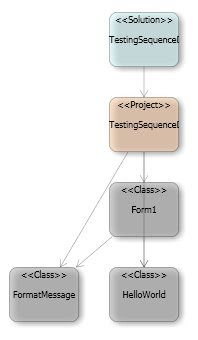 From this diagram, I can navigate through the code, clicking the class shapes.
In my previous post, I use Architecture Explorer to generate a Sequence Diagram. Now I go to explain how to see all class dependencies inside our solution.
I added to my sample project, a new class FormatMessage, that modify the returned message from HelloWorld class.
The code in my form (Form1) when I click the submit button is:
Private Sub btnSubmit_Click(ByVal sender As System.Object, ByVal e As System.EventArgs) Handles btnSubmit.Click
Dim helloClass As New HelloWorld(txtName.Text)
Dim formatMessage As New FormatMessage(helloClass.SayHello())
lblHelloName.Text = formatMessage.CustomMessage()
End Sub
My class Form1 has dependencies with HelloWorld class and with FormatMessage class. We can see this dependencies from the Architecture Explorer:
Click on View -> Architecture Explorer menu and choose:
Column 1) "TestingSequenceDiagrams" Solution
Column 2) Contains
Column 3) "TestingSequenceDiagrams" Project
Column 4) Contains
Column 5) "Form1", "HelloWorld" and "FormatMessage"
And the result is...
 From this diagram, I can navigate through the code, clicking the class shapes.
Saturday, July 05, 2008
New features in VSTS "Rosario": UML Sequence Diagram
I have download the April 2008 CTP Visual Studio Team System Code Name "Rosario" VPC Image to test the new features.
In this article I will talk about the Sequence Diagram feature. In VSTS "Rosario" we can either create a sequence diagram from scratch and generate the associated code or we can write our code and using reverse-engineer to generate our sequence diagram.
For example, I write a sample solution "TestingSequenceDiagrams" with a project "TestingSequenceDiagrams" with a typical "Hello World" windows form application with a form (Form1), a button (btnSubmit), a textbox (txtName), a label (lblHelloName) and a HelloWorld class with a SayHello function. The btnSubmit click event code is:
Private Sub btnSubmit_Click(ByVal sender As System.Object, ByVal e As System.EventArgs) Handles btnSubmit.Click
Dim helloClass As New HelloWorld(txtName.Text)
lblHelloName.Text = helloClass.SayHello()
End Sub
Next, I add a new blank sequence diagram: Right button at the project element -> Add -> New Item... -> Common Items -> General -> Sequence Diagram.
Next step is going to View -> Architecture Explorer menu and choose:
Column 1) "TestingSequenceDiagrams" Solution
Column 2) Contains
Column 3) "TestingSequenceDiagrams" Project
Column 4) Contains
Column 5) "Form1"
Column 6) Contains
Column 7) "btnSubmit_Click"
Column 8) Insert into Active Diagram
And the result is the btnSubmit_Click method sequence diagram...
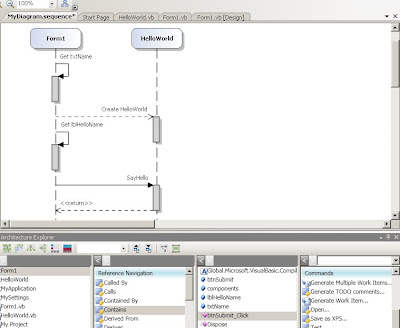
In this article I will talk about the Sequence Diagram feature. In VSTS "Rosario" we can either create a sequence diagram from scratch and generate the associated code or we can write our code and using reverse-engineer to generate our sequence diagram.
For example, I write a sample solution "TestingSequenceDiagrams" with a project "TestingSequenceDiagrams" with a typical "Hello World" windows form application with a form (Form1), a button (btnSubmit), a textbox (txtName), a label (lblHelloName) and a HelloWorld class with a SayHello function. The btnSubmit click event code is:
Private Sub btnSubmit_Click(ByVal sender As System.Object, ByVal e As System.EventArgs) Handles btnSubmit.Click
Dim helloClass As New HelloWorld(txtName.Text)
lblHelloName.Text = helloClass.SayHello()
End Sub
Next, I add a new blank sequence diagram: Right button at the project element -> Add -> New Item... -> Common Items -> General -> Sequence Diagram.
Next step is going to View -> Architecture Explorer menu and choose:
Column 1) "TestingSequenceDiagrams" Solution
Column 2) Contains
Column 3) "TestingSequenceDiagrams" Project
Column 4) Contains
Column 5) "Form1"
Column 6) Contains
Column 7) "btnSubmit_Click"
Column 8) Insert into Active Diagram
And the result is the btnSubmit_Click method sequence diagram...

Thursday, June 26, 2008
Publishing Schemas as Web Services: "This invalid type may be from a property schema"
Few days ago, I was trying to publish a schema as a Web Service through BizTalk Web Services Publishing Wizard. When I tried to test this Web Service through a Xml Validation pipeline, I received the error "This invalid type may be from a property schema":
 This error is due the fact that the BizTalk Web Services Publishing Wizard sets the DocumentSpecName when invokes the web method. My problem was, that my schema had two root nodes and BizTalk Web Services Publishing Wizard don't set in DocumentSpecName the root node:
string bodyTypeAssemblyQualifiedName = "Company.ESB.PC02._02.SOAPService_company_es_ConectorWS_servi" + "ces_SN627003, Company.ESB.PC02.02, Version=1.0.0.0, Culture=neutral, Public" + "KeyToken=9431070526ed7a05";
There are two approaches to resolve this problem:
1) Set the root node in the Web Service:
string bodyTypeAssemblyQualifiedName = "Company.ESB.PC02._02.SOAPService_company_es_ConectorWS_servi" + "ces_SN627003+Root1, Company.ESB.PC02.02, Version=1.0.0.0, Culture=neutral, Public" + "KeyToken=9431070526ed7a05";
2) Set to null this param in the Web Service:
object[] invokeResults = this.Invoke("WebMethod1", invokeParams, inParamInfos, outParamInfos, 0, null, inHeaders, inoutHeaders, out inoutHeaderResponses, out outHeaderResponses, null, null, null, out unknownHeaderResponses, false, false);
Thursday, June 05, 2008
BizTalk Expert Series
QuickLearn offers new BizTalk specialized courses in advanced topics:
- BizTalk Expert Series: Business Activity Monitoring (BAM)
- BizTalk Expert Series: Business Rule Engine (BRE)
- BizTalk Expert Series: RFID Solutions
- BizTalk Expert Series: ESB Solutions
- BizTalk Expert Series: EDI Integration
- BizTalk Expert Series: Testing Strategies
More information in QuickLearn site.
- BizTalk Expert Series: Business Activity Monitoring (BAM)
- BizTalk Expert Series: Business Rule Engine (BRE)
- BizTalk Expert Series: RFID Solutions
- BizTalk Expert Series: ESB Solutions
- BizTalk Expert Series: EDI Integration
- BizTalk Expert Series: Testing Strategies
More information in QuickLearn site.
Sunday, June 01, 2008
ESB Guidance: Get Map from UDDI
Inside ESB Guidance, we can use UDDI to get TransportType, TransportLocation, ... and also we can get from UDDI the Map to apply.
First of all, we have to insert an UDDI service, with TransformType property and the value of the map that we will want to apply (map name and assembly), for example:

In previous example, I have setted the value "TransformType://GlobalBank.ESB.DynamicResolution.Transforms.SubmitOrderRequestNA_To_SubmitPurchaseOrderRequestCN,GlobalBank.ESB.DynamicResolution.Transforms, Version=1.0.0.0, Culture=neutral, PublicKeyToken=c2c8b2b87f54180a".
Next, we add a Receive Location and use a Receive Pipeline with a ESB Dispatcher Disassembler Component, for example. We set the component's MapName property, to our UDDI service connection string, for example:
UDDI:\\serverUrl=http://localhost/uddi;serviceName=MyService;serviceProvider=MyProvider
Finally, we have to do a little change inside the ESB's resolver UDDI class (Microsoft.Practices.ESB.Resolver.UDDI.ResolveProvider). Inside the CopyResolution method, add inside the try block this line:
if (!string.IsNullOrEmpty(source.TransformType)) destination.TransformType = source.TransformType;
Now, we can use UDDI to get the transformation to apply.
First of all, we have to insert an UDDI service, with TransformType property and the value of the map that we will want to apply (map name and assembly), for example:

In previous example, I have setted the value "TransformType://GlobalBank.ESB.DynamicResolution.Transforms.SubmitOrderRequestNA_To_SubmitPurchaseOrderRequestCN,GlobalBank.ESB.DynamicResolution.Transforms, Version=1.0.0.0, Culture=neutral, PublicKeyToken=c2c8b2b87f54180a".
Next, we add a Receive Location and use a Receive Pipeline with a ESB Dispatcher Disassembler Component, for example. We set the component's MapName property, to our UDDI service connection string, for example:
UDDI:\\serverUrl=http://localhost/uddi;serviceName=MyService;serviceProvider=MyProvider
Finally, we have to do a little change inside the ESB's resolver UDDI class (Microsoft.Practices.ESB.Resolver.UDDI.ResolveProvider). Inside the CopyResolution method, add inside the try block this line:
if (!string.IsNullOrEmpty(source.TransformType)) destination.TransformType = source.TransformType;
Now, we can use UDDI to get the transformation to apply.
Monday, May 19, 2008
SOA and ESB Architecture with BizTalk
Searching info about ESB Guidance, I found a recent little book (25 pages) by Robert V. Hogg & Ewan Fairweather, that seems to be very interesting.
This is the link http://www.wrox.com/WileyCDA/WroxTitle/productCd-047027011X.html.
This is the link http://www.wrox.com/WileyCDA/WroxTitle/productCd-047027011X.html.
BizTalk Accelerator for SWIFT 2008 Message Pack
BizTalk Server Team have launched Evaluation Program of BizTalk Accelerator for SWIFT 2008 Message Pack to test the next release of this product. BizTalk Accelerator for SWIFT 2008 Message Pack will provide compliance with SWIFT 2008 Standards Release Guide (SRG) specification.
The planned release schedule is:
- June 23, 2008 -> CTP
- July 21, 2008 -> Beta
- September 5, 2008 -> RTW
The 2008 Message Pack will include:
- Complete re-packaging of all SWIFT FIN Flat File message types and business rules.
- Updates to all message schemas and business rules for compliance with SWIFT 2008 Certification requirements.
- Roll-up of all schemas and business rule Hot fixes not superseded by 2008 requirements.
- Validation of SWIFT Reference data as a business rule rather than a schema
The planned release schedule is:
- June 23, 2008 -> CTP
- July 21, 2008 -> Beta
- September 5, 2008 -> RTW
The 2008 Message Pack will include:
- Complete re-packaging of all SWIFT FIN Flat File message types and business rules.
- Updates to all message schemas and business rules for compliance with SWIFT 2008 Certification requirements.
- Roll-up of all schemas and business rule Hot fixes not superseded by 2008 requirements.
- Validation of SWIFT Reference data as a business rule rather than a schema
Friday, May 09, 2008
Endless XmlDisassembler
This is a curious behaviour of XmlDisassembler component. My problem was that I have developed a custom XmlDisassembler, that inside uses BizTalk XmlDisassembler component (Microsoft.BizTalk.Component.XmlDasmComp).
My component disassembles the message with the BizTalk component and discard some of the returned messages, based on some conditions. The problem is when I call XmlDasmComp's GetNext method, never ends.
Why? The problem is that in my conditions to discard the returned messages, I don't need to read the returned message. Inside the XmlDasmComp, in GetNext2 private method, it test a property 'IsNewDoc' to retrieve a new message or not. This property is updated only when we read the returned message.
Why this property is updated only when we read the returned message? Obvious, in BizTalk standard behaviour, it always read the returned message before to call GetNext method other time.
Standard behaviour in a BizTalk disassemble is:
1) XmlDasmComp.Disassemble
2) XmlDasmComp.GetNext (First Message)
3) Validate and ResolvePartyComponents (this components can read the message)
4) Receive Pipeline ends, then BizTalk READ THE MESSAGE
5) XmlDasmComp.GetNext (Second Message)
...
Until GetNext method returns a null message.
In my component, I was calling GetNext method continuosly without reading the message, so 'IsNewDoc' never was updated and GetNext method never ends.
Solution is, after calling GetNext method, I read the message and then I seek to the begin the message (If no, the internal Stream is in the last position and next components couldn't read it)
My component disassembles the message with the BizTalk component and discard some of the returned messages, based on some conditions. The problem is when I call XmlDasmComp's GetNext method, never ends.
Why? The problem is that in my conditions to discard the returned messages, I don't need to read the returned message. Inside the XmlDasmComp, in GetNext2 private method, it test a property 'IsNewDoc' to retrieve a new message or not. This property is updated only when we read the returned message.
Why this property is updated only when we read the returned message? Obvious, in BizTalk standard behaviour, it always read the returned message before to call GetNext method other time.
Standard behaviour in a BizTalk disassemble is:
1) XmlDasmComp.Disassemble
2) XmlDasmComp.GetNext (First Message)
3) Validate and ResolvePartyComponents (this components can read the message)
4) Receive Pipeline ends, then BizTalk READ THE MESSAGE
5) XmlDasmComp.GetNext (Second Message)
...
Until GetNext method returns a null message.
In my component, I was calling GetNext method continuosly without reading the message, so 'IsNewDoc' never was updated and GetNext method never ends.
Solution is, after calling GetNext method, I read the message and then I seek to the begin the message (If no, the internal Stream is in the last position and next components couldn't read it)
Thursday, May 08, 2008
Deploy Orchestrations: "Failed to update binding information"
Yesterday, I was redeploying an orchestration through BizTalk MMC -> MyApplication -> Add -> BizTalk Assemblies... with "Overwrite all" checked, when I received this error:

The detail error said that "Receive Location 'Receive Location MQ por FILE' has no Transport type specified.". I was confused, because Receive Location 'Receive Location MQ por FILE' didn't exists, it was a Receive Location that I have deleted weeks ago.
Searching for BindingInfo inside my computer, I discovered that BizTalk stores info about the last deployments in C:\Documents and Settings\[user name]\Application Data\Microsoft\BizTalk Server\Deployment\BindingFiles (over Vista in C:\Users\[user name]\AppData\Roaming\Microsoft\BizTalk Server\Deployment\BindingFiles).
When you do a redeployment, BizTalk uses this information. If this information is erroneous, we get this error "Failed to update binding information".
Solution is easy, remove the info binding file and we can redeploy our orchestration.

The detail error said that "Receive Location 'Receive Location MQ por FILE' has no Transport type specified.". I was confused, because Receive Location 'Receive Location MQ por FILE' didn't exists, it was a Receive Location that I have deleted weeks ago.
Searching for BindingInfo inside my computer, I discovered that BizTalk stores info about the last deployments in C:\Documents and Settings\[user name]\Application Data\Microsoft\BizTalk Server\Deployment\BindingFiles (over Vista in C:\Users\[user name]\AppData\Roaming\Microsoft\BizTalk Server\Deployment\BindingFiles).
When you do a redeployment, BizTalk uses this information. If this information is erroneous, we get this error "Failed to update binding information".
Solution is easy, remove the info binding file and we can redeploy our orchestration.
Subscribe to:
Posts (Atom)